WooCommerce shipping for Africa,
built for real addresses.
WooCommerce address fields aren't built for Africa — customers enter bad addresses, deliveries fail. AfriRegions adds smart Region → City → Neighborhood dropdowns and zone-based shipping rates to your checkout.

WooCommerce features built for Africa.
Smart address fields, zone-based shipping, and delivery tools for 19 African countries.
Included Free
Cascading Dropdowns
Region → City → Neighborhood auto-populated fields with Select2 search and accent-insensitive matching.
Zone-Based Shipping
Cascading rate priority: Neighborhood > City > Region > Default. Most specific rule wins automatically.
Address Validation
Verify region/city/neighborhood consistency at checkout. Prevent mismatches before order placement.
Landmark Directions
Optional text field for delivery instructions like 'Near Total station, blue building, 2nd floor'.
Statistics Dashboard
Order breakdown by region and city with revenue tracking, date filters, and geographic leaderboard.
Delivery Restrictions
Block orders from specific regions or cities with custom messages and visual restriction editor.
Geo Data Manager
Add custom cities or neighborhoods per region with accordion UI, search, and AJAX — no page reloads.
Activity Log
Chronological history of all changes with color-coded actions, filters, user tracking, and date ranges.
Unlock with Pro
Smart Search
ProType a neighborhood and auto-fill all address fields with fuzzy matching and typo tolerance.
Pickup Points
ProDefine pickup locations with name, address, phone & hours. Auto-filtered by customer city.
Travel Agency Shipping
ProIntercity delivery via travel agencies with route-based pricing. Popular in Cameroon, Senegal & more.
REST API
ProFull API with endpoints for regions, cities, neighborhoods, and search. Rate-limited and CORS-protected.
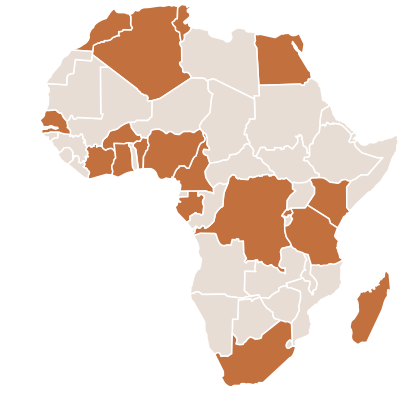
19 African Countries, Thousands of Zones
Pre-loaded geographic data with regions, cities, and neighborhoods for each country. Add custom zones anytime through the admin panel.
Install the plugin in 4 simple steps
Install & Activate
Upload the plugin to WordPress, activate it, and choose your country.
Configure Shipping
Set up zone-based rates for regions, cities, and neighborhoods.
Customize Checkout
Enable Smart Search, address validation, and landmark fields.
Start Selling
Customers get structured address fields and accurate shipping rates.
What Our Users Say
Store owners and WordPress developers share their experience with AfriRegions.
“AfriRegions completely transformed our checkout. Before, 30% of orders had wrong addresses. Now it's nearly zero. The cascading dropdowns are intuitive and customers love them.”
“Zone-based shipping was a game changer. We can now charge different rates for Accra vs rural areas. Setup took 10 minutes. Highly recommend for any African WooCommerce store.”
“I install AfriRegions on every client project. The Geo Data Manager makes it easy to add custom neighborhoods, and the REST API is clean and well-documented. Pro is worth every penny.”
“We manage 12 WooCommerce stores across West Africa. The 50-site license is perfect. Smart Search alone reduced checkout abandonment by 20% — customers find their neighborhood instantly.”
“The Travel Agency shipping method is exactly what we needed. Our customers pick their preferred bus company at checkout and we ship via that route. No other plugin does this.”
“Great plugin with solid documentation. The free version covers most needs. I upgraded to Pro for the CSV import — migrating 500+ neighborhoods from a spreadsheet was seamless.”
Frequently Asked Questions
AfriRegions supports 19 countries: Algeria, Benin, Burkina Faso, Cameroon, Cote d'Ivoire, DR Congo, Egypt, Gabon, Ghana, Kenya, Madagascar, Mauritius, Morocco, Nigeria, Rwanda, Senegal, South Africa, Tanzania, and Tunisia. Each includes pre-loaded regions, cities, and neighborhoods.
Yes! AfriRegions is tested up to WooCommerce 9.4 and WordPress 6.9. It is fully compatible with HPOS (High-Performance Order Storage) and works with both the new custom orders table and classic post-based orders.
Absolutely. The Geo Data Manager in the admin panel lets you add custom cities or neighborhoods to any region via an accordion UI with search — no page reloads needed. You can also use the filter hook scpwoo_custom_places_{cc} for programmatic additions.
You define shipping rates at different levels: Region, City, and Neighborhood. AfriRegions uses a cascading priority system — the most specific rule wins. For example, if you set a rate for both 'Centre' region and 'Yaoundé' city, the city rate applies for Yaoundé customers.
Smart Search is a Pro feature that lets customers type a neighborhood name and instantly auto-fill all address fields (Region, City, Neighborhood). It uses fuzzy matching with Levenshtein tolerance, so typing 'Bastos' will auto-fill Yaoundé + Centre automatically.
The Free version includes cascading dropdowns, zone shipping, address validation, restrictions, statistics, and activity log. Pro adds Smart Search, Pickup Point shipping, Travel Agency shipping, REST API, CSV import/export, shipping tiers, and the free shipping progress badge.
Yes. AfriRegions supports Zone-Based Shipping (core), Pickup Points (Pro), and Travel Agency Shipping (Pro). Each can have multiple tiers (Standard, Express, Same Day) with per-tier surcharges and delivery estimates.
Yes, the Pro version includes a full REST API at /wp-json/scpwoo/v1/ with endpoints for regions, cities, neighborhoods, and search. It's rate-limited (120 requests/minute per IP), CORS-protected, and opt-in via Settings.